
Post to all social media at once
WriteOnce is a cross-posting scheduler built for people on eight to ten platforms. Write one caption, attach media once, pick your networks, and publish or schedule in a single action through each platform's official API.
At 10 connected platforms, WriteOnce charges $19 per month flat; Buffer Essentials charges about $50 per month at $5 per channel, as listed on buffer.com/pricing in July 2026.









Written by Farirai Masocha, founder of WriteOnce. Platform limits and competitor pricing last checked July 2026.
How to post to all social media at once
Connect your accounts, write one post, and publish or schedule to every platform in a single action.
Connect your accounts
Link Instagram, X, TikTok, LinkedIn, YouTube and more in two clicks. Secure connections that refresh themselves, so you never log in twice.
Create your post once
Write your caption, add media from your library, and pick which platforms to publish to before it goes live.
Schedule & publish
Post now or pick a date and time. One calendar runs it all.
Post to 10 social networks at once
Instagram, TikTok, X, LinkedIn, YouTube, Facebook, Threads, Pinterest, Reddit, and Bluesky. Connect once, publish everywhere from one composer.
 Twitter / X
 Instagram
 LinkedIn
 Facebook
 TikTok
 YouTube
 Threads
 Pinterest
 Reddit
 Bluesky
- More to come
I used to open five tabs for every post. Now I write once, schedule the week, and move on to actually creating.
 Farai MatsikaFounder and builder
The manual way vs one publish
Same result on your feeds. Very different afternoons.
Posting by hand
- Open 10 apps or browser tabs, one per platform
- Paste the caption 10 times, fixing length limits by hand
- Re-upload the same image or video to every platform
- Try to hit the right posting time on each app
- Repeat tomorrow, and every day after
Posting with WriteOnce
- Write one caption in one composer
- Character counter clamps to your strictest platform
- Media uploads once, publishes everywhere
- Schedule once, or let the queue pick your best slots
- Per-platform results tell you exactly what published
One composer, every platform
This is the whole product. Write the caption, attach the media once, and tick the platforms it should go to. The counter underneath tracks the strictest limit among everything you selected, so you are never guessing whether the post fits.
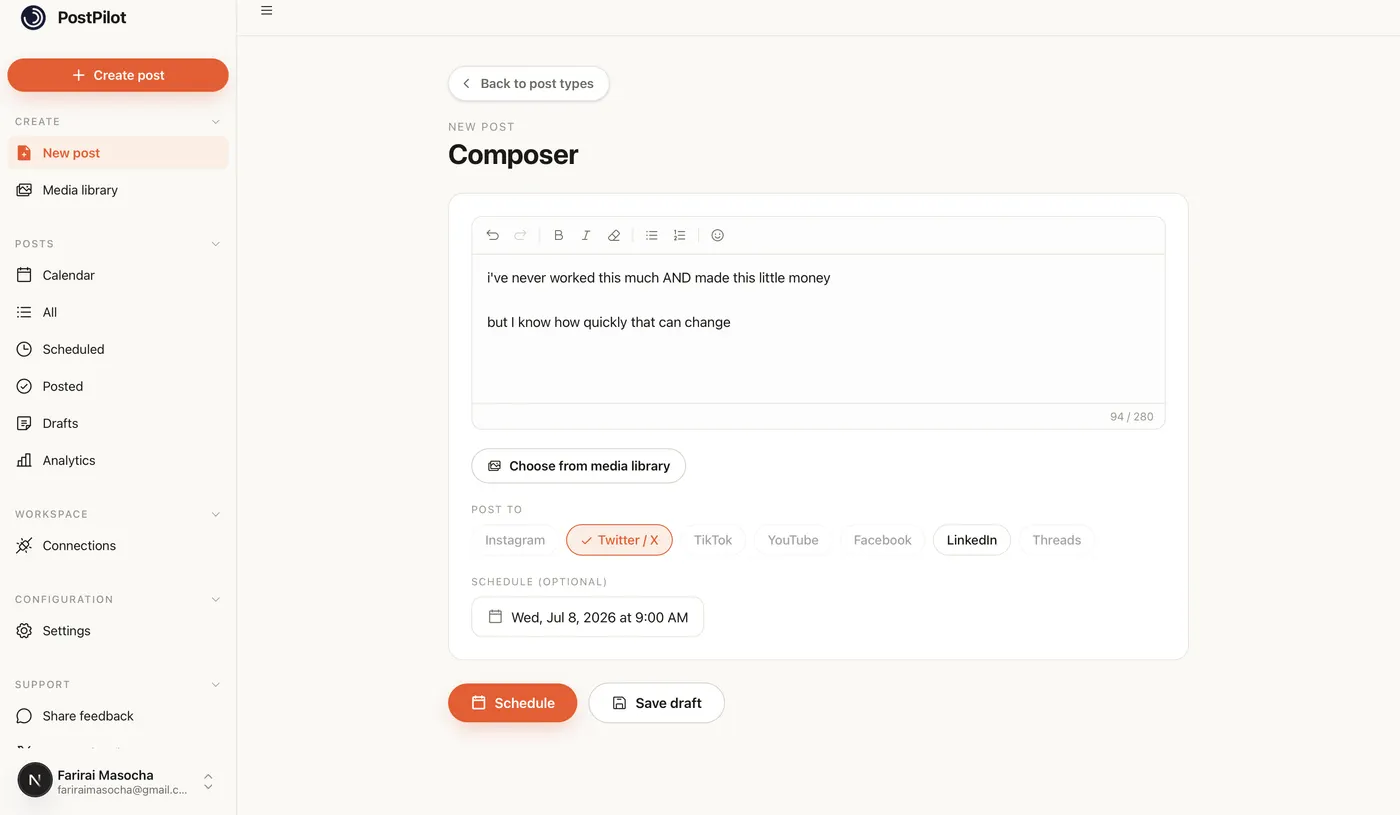
Platforms that cannot accept what you attached are removed from the selection rather than left to fail at publish time. Attach a photo and YouTube drops out. Attach nothing and only the platforms that take plain text stay available. Checking a caption against a single platform first? The free character counter does that part without an account.
What each platform actually needs
"Post everywhere at once" only works if the tool respects what each platform will accept. Every limit below is read from the same configuration the composer uses, so this page cannot promise something the app refuses to publish.
The platform people most want to automate and most often cannot. Photos and video both publish through the official API, and the 2,200-character caption limit means an Instagram caption almost never needs trimming when it starts life as a post for somewhere stricter.
- Caption limit
- 2,200
- Publishes
- photos, video
Twitter / X
The tightest limit in the set, which makes X the platform that decides how long your shared caption can be. Select X alongside anything else and the counter clamps to 280, so you find out before you publish rather than after the sentence gets cut.
- Caption limit
- 280
- Publishes
- text, photos, video
TikTok
Video-first, with a generous caption allowance that most people never fill. Upload the video once in WriteOnce and it goes to TikTok and to every other video platform you ticked, instead of exporting and re-uploading the same file four times.
- Caption limit
- 4,000
- Publishes
- photos, video
Long enough for a real post at 3,000 characters, and the platform where a considered version usually outperforms the short one. Write the long version for LinkedIn and let the composer warn you where it will not fit elsewhere.
- Caption limit
- 3,000
- Publishes
- text, photos, video
YouTube
The one platform in the set that will not take a photo post. WriteOnce hides YouTube unless your post has video attached, so you cannot accidentally schedule a text update to a channel that has no way to display it.
- Caption limit
- 5,000
- Publishes
- video
Effectively unlimited caption length, which makes Facebook the safe destination for long posts. Useful as the full-length version when the same idea has to be cut down for X and Bluesky in the same publish.
- Caption limit
- 63,206
- Publishes
- text, photos, video
Threads
Sits between X and Instagram in both format and audience. Short text, optional media, and a limit generous enough that a post written for X almost always fits Threads without a second thought.
- Caption limit
- 500
- Publishes
- text, photos, video
Bluesky
A 300-character limit and a genuinely active audience that most legacy schedulers still ignore. If you already write for X, the same post fits Bluesky with nothing to change.
- Caption limit
- 300
- Publishes
- text, photos, video
The platform where cross-posting most often goes wrong, because the post has to land in the right subreddit with the right flair. WriteOnce asks for both before it publishes instead of guessing.
- Caption limit
- 300
- Publishes
- text, photos
The strictest title in the set at 100 characters, and it needs an image. Pins go to a specific board rather than a generic feed, so Pinterest is picked deliberately rather than swept up with everything else.
- Caption limit
- 100
- Publishes
- photos, video
One draft, ten destinations
Posting by hand scales badly in a specific way: the work does not grow with how much you have to say, it grows with how many platforms you are on. Ten platforms means ten uploads of the same file and ten chances to paste the wrong caption.
Publishing once collapses that back down. The draft is the unit of work again, and the platform count stops being your problem. Adding an eleventh platform later costs you one checkbox, not another afternoon.
One publish. Ten results you can check individually.
What it costs to post to 10 platforms at once
Most schedulers charge per connected channel or account. That model is fine at two or three platforms and punishing at ten, which is exactly the number you need to post everywhere. Same shopping basket, five tools, prices read from each vendor's site in July 2026.
At 10 connected platforms, WriteOnce charges $19 per month flat; Buffer Essentials charges about $50 per month at $5 per channel, as listed on buffer.com/pricing in July 2026.
| Tool | Monthly cost | Pricing model | Plan cited | Source |
|---|---|---|---|---|
| WriteOnce | $19/mo | Flat monthly | Creator (all 10 platforms) | writeonce.one pricingChecked July 2026 |
| Metricool | $25/mo | By brand count | Starter ($25/mo monthly for 5 brands) | metricool.com/pricingChecked July 2026 |
| PostEverywhere | $29/mo | Flat monthly | Starter (10 social accounts) | posteverywhere.ai/pricingChecked July 2026 |
| Socialync | $45/mo | Base + per account | Base ($20/mo, 5 accounts) + 5 add-ons at $5 each | socialync.io/pricingChecked July 2026 |
| Buffer | $50/mo | Per channel | Essentials ($5 × 10 channels) | buffer.com/pricingChecked July 2026 |
Metricool bills by brand count, not by channel. Starter is $25/mo on monthly billing for 5 brands, and each brand can connect every network it supports. Buffer math assumes 10 channels on Essentials. Socialync math is $20/mo for five accounts plus $5/mo for each of the next five. PostEverywhere Starter includes 10 social accounts on one flat plan.
Honest limitation: WriteOnce does not include a team approval workflow or unified engagement inbox. If comments and DMs inside the scheduler are your daily workflow, Buffer or Hootsuite remains the safer pick. WriteOnce is built for solo creators and small brands who cross-post daily and want one flat bill for every platform.
Buffer is a good product and its free tier covers three channels. The point is not that it is expensive, it is that per-channel pricing bills you for the exact thing this page is about. See the full WriteOnce vs Buffer comparison or our roundup of best social media schedulers for 2026, including cases where another tool is the better buy.
Publish now, or fill a week in one sitting
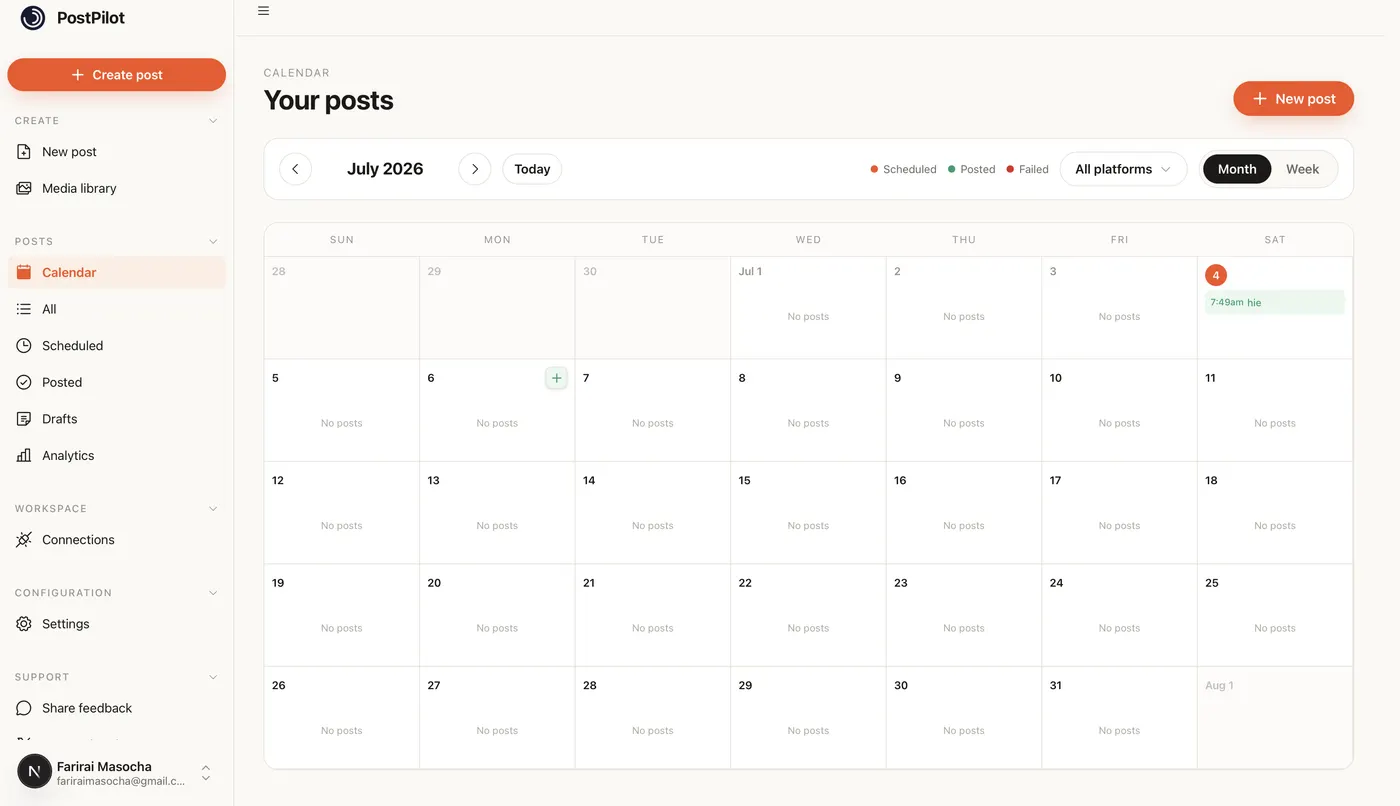
Posting everywhere at once is most useful when you are not doing it live. Write several posts in one session, put them on the calendar, and every one of them fans out to its full platform list on the date you picked. Scheduled, published, and failed posts all sit on the same calendar, so a post that did not go out is visible instead of silently missing.
Posting everywhere, answered
It depends what you optimize for. If you connect eight to ten platforms regularly and want one flat bill, WriteOnce ($19/mo Creator) and PostEverywhere ($29/mo Starter) price by plan, not per channel. Buffer Essentials runs about $50/mo at ten channels ($5 each on buffer.com/pricing). If team approvals and a unified comment inbox matter more than platform count, Buffer or Hootsuite is still the safer pick. Every price here was read from vendor pricing pages in July 2026.
Or dig into one platform
Every platform has its own limits and quirks. Here is how WriteOnce handles each one.
Bluesky schedulerThreads schedulerReddit schedulerPinterest schedulerX schedulerLinkedIn post schedulerInstagram schedulerTikTok schedulerYouTube schedulerFacebook schedulerKeep reading
The cross-posting guide covers when to adapt a post per platform and when to leave it alone. Turn one post into ten is the repurposing side of the same idea, and how to schedule social media posts walks through building a queue you can actually keep up with. If you are still comparing tools, we put WriteOnce next to the alternatives in the best social media schedulers for 2026, including the cases where another tool is the better buy.
Ready to put your posting on autopilot?
Every plan includes a 7-day free trial. Cancel anytime.